
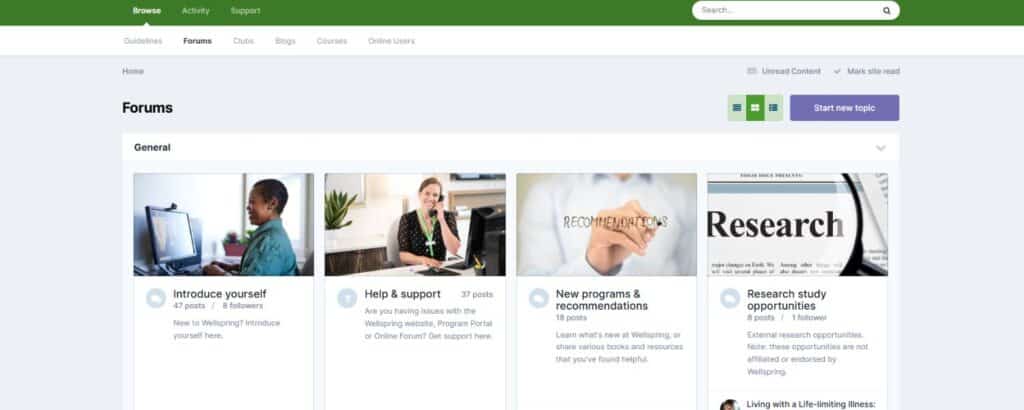

Yes, Wellspring’s private Community Forum is an online cancer community built exclusively for Wellspring members, meaning everyone you’ll meet there is navigating a cancer journey of their own. Unlike general social media, this is a dedicated, secure space where you can participate in topic-based discussions, ask questions, share experiences, and find others who genuinely get it — without having to explain yourself. The forum is organized around Discussion Forums covering topics from specific cancer types and stages to program recommendations, so conversations are relevant to where you actually are in your journey. Visit community.wellspring.ca to sign in with your Wellspring account and start exploring.
Privacy and safety are central to how the Wellspring Community Forum is built. Access is restricted exclusively to Wellspring members — you cannot participate in discussions, join groups, or send messages without first being a member and agreeing to the Community Forum guidelines. Members also have the ability to report any questionable content, and can customize their own experience by removing features like the private inbox if they prefer not to use them. To learn more about how the forum works and to log in securely, visit community.wellspring.ca.
Wellspring’s Community Forum offers multiple ways to connect, so you can engage at whatever level feels comfortable for you. Discussion Forums let you join broader conversations on topics like cancer type, stage, or program experiences; Clubs allow you to find a smaller, more focused group based on specific shared criteria like your location or the programs you attend; and the Private Inbox lets you message individuals or groups directly and privately. If you want to share your story more openly, the Blogs feature lets you document your journey. Because there are genuinely different options depending on how you like to connect, the best way to find your fit is to log in and browse — visit community.wellspring.ca to get started.
Yes, Wellspring’s Clubs feature is designed exactly for this kind of connection, allowing members to create or join smaller, more specific groups based on shared criteria such as geographic location or participation in particular Wellspring programs. This makes it possible to build a more personal peer network within the larger community — whether you’re looking for someone local to connect with or hoping to stay in touch with others from a program you’ve attended. Clubs bring a neighbourly, close-knit quality to the broader online cancer community, making it easier to find your people rather than searching through general discussions. The ability to create your own Club means the community can grow and shape itself around what members actually need. Sign in at community.wellspring.ca to browse existing Clubs or start one of your own.
Wellspring’s Community Forum includes a Blogs feature that gives members a dedicated space to write about and document their cancer journey in their own words and at their own pace. Writing about your experience can also be a meaningful act of processing and reflection for yourself, not just for others. Many members find that putting their journey into words — and having it witnessed — is a powerful part of living with cancer. Log in at community.wellspring.ca to set up your blog and start sharing when you’re ready.
No separate account is needed. The Wellspring Community Forum is accessible to all current Wellspring members using the same login credentials as your regular Wellspring Portal account. To get started, simply go to community.wellspring.ca, click the “Existing user? Sign In” dropdown in the upper right corner, and select “Wellspring Portal Account” to log in. Once you’ve agreed to the Community Forum guidelines, you can immediately begin exploring discussions, joining Clubs, sending private messages, and connecting with the broader cancer peer support community.